---
title: Call 1
description: This is the first and most important Call Stage. After you reach out to the lead for the first time by phone, if you were unable to reach them, move them to this stage. Make sure that you pay special
---
[Skip to content](https://help.180medical.com/knowledge/call-1#main-content)
English
Show submenu for translations
[Contact us](https://help.180medical.com/knowledge/kb-tickets/new?hsLang=en)
![logo-1.png\]](https://help.180medical.com/hs-fs/hubfs/logo-1.png?height=40&name=logo-1.png)
Open main navigation
Close main navigation
- English
Show submenu for translations
- [Contact us](https://help.180medical.com/knowledge/kb-tickets/new)
- Go to www.180medical.com
Go to www.180medical.com
180 Medical Hubspot Resources
- There are no suggestions because the search field is empty.
1. [Help Center](https://help.180medical.com/knowledge?hsLang=en)
2. [Online Lead Specialists](https://help.180medical.com/knowledge/online-lead-specialists?hsLang=en)
3. [Deal Stage Details](https://help.180medical.com/knowledge/online-lead-specialists?hsLang=en#deal-stage-details)
# Call 1
This is the first and most important Call Stage. After you reach out to the lead for the first time by phone, if you were **unable to reach them,** move them to this stage. Make sure that you pay special attention to the required properties below, and answer them correctly.
#### Required Properties
1. Select Email Lead Type
| Did the lead fill out the **Contact Form** on any page? | Select Short Form Emails |
| --- | --- |
| Did the lead fill out the **Request Samples** Form**, Order Supplies** Form, or **Insurance Verification** Form**?** | Select Long Form Emails. Choose from the available options based on what information the customer has provided and what you still need. |
2. Manual Text Message Sent?
1. If you sent a personal message to address the lead's **How May We Help You** question, select **Yes**
2. If you have not composed and sent a text, select **No**
**NOTE:** Do not copy and paste a generic message into a text and send it. If you don't have a customized message to send, the system will send a generic one automatically for you.
#### Automated Communications
- Email
| **URO - Short Form** | **OSTOMY - Short Form** |
| --- | --- |
| - [180 Medical Email Day 1](https://email.180medical.com/180medicalsalesemail1?hs_preview=MJoOgrPF-72764673596&ecid=ACsprvsx6ivlu2i2V7s_AW6aYm83y7wQmDFox0rrS8kk-plxpDYbCVS_Ag5eI-is3ocJ_n4rYCxu&hsLang=en) - [PCM Version](https://email.180medical.com/pcmsalesemail1?hs_preview=BxTmxYhW-72958602379&ecid=ACsprvvOXl1MWeqlxPfmXyzALB4wJzyM8cwrUII2xX-fSh4DRPbcRFJ-dGMJWdEr5ZsY7FZ1__eZ&hsLang=en) - [180 Medical Email Day 7](https://email.180medical.com/your-request-for-medical-supplies-1716566370901?hs_preview=FwaniByl-78564871965&ecid=ACsprvumxJpKILtQe8GPTWsDdWGqdJIOu2K-97QLYkVAsEBHQVd89mHRNUg2rRj0HMqopJX9KQih&hsLang=en)\* | - [180 Medical Email Day 1](https://email.180medical.com/180medicalsalesemail1?hs_preview=MJoOgrPF-72764673596&ecid=ACsprvsFsL2Nskdkx_lHaRB4fcYepQuKdm9sF95bFVkAD8i6y0eQQPbxtQhOfgitCMQ3gQjD4UV-&hsLang=en) - [PCM Version](https://email.180medical.com/pcmsalesemail1?hs_preview=BxTmxYhW-72958602379&ecid=ACsprvu4RgpM4Kr3S6bK7zlktYNcPwDgYuTUYMHLUBKxGA3OcE-o4Hg7UT462zMmL5UKUA9tNhdR&hsLang=en) - [180 Medical Email Day 7](https://email.180medical.com/your-request-for-medical-supplies-1716566370901?hs_preview=FwaniByl-78564871965&ecid=ACsprvubUBmdDcbqlhs9dlvSqLK-8Z86BEgVmvw9fZdPjDHQltBPaH7LZTN9w3b0d-TfTOzc0Qly&hsLang=en)\* |
| **URO and OSTOMY - Long Form** | |
| - [Long Form Need Insurance](https://email.180medical.com/needinsuranceinfo?hs_preview=DXwMwoil-72949403696&ecid=ACsprvsqfMGYvq5iY4myWwew8pXAZ1tWJ0PfWHfdXbsWxLpOJZnspI-AH8yAEN9blGMzf7B6fZnL&hsLang=en) - [Long Form Need Doctor](https://email.180medical.com/confirm-your-prescription?hs_preview=iVvaIiKK-72950755256&ecid=ACsprvv9L1vGa8j30DecsJXgpxYnp8zrdYJUcb4tDJOo4ryYLg3f749q5OVpez2W707hig0WrSM8&hsLang=en) - [Long Form Need Insurance AND Doctor](https://email.180medical.com/need-insurance-and-doctor-info?hs_preview=Yfobdgjk-93937283611&ecid=ACsprvt1kiGC-f82VARtlKpW1E_xI1rrpx1uk5qXHvPx3fxk27sXT9jYDjl7iQ8j_aBobMxQ0gxx&hsLang=en) - [Long Form Need Confirmation](https://email.180medical.com/confirm-your-order?hs_preview=rgdTEpBu-72949683867&ecid=ACsprvs3JUhj1NAr3oaz-bb_wrlUV17yLLOSPlg-WNhWYoFUvZLKKb-MvFigUFJMYLUX50t22l8t&hsLang=en) | |
**NOTE:** There is a major difference between the content of short form emails and the content of long-form emails. In order to ensure the customer experience makes sense, make sure you select the correct option.
- SMS
- If you selected YES to Manual Text Message Sent: NONE
- If you selected NO to Manual Text Message Sent: SMS Day 1
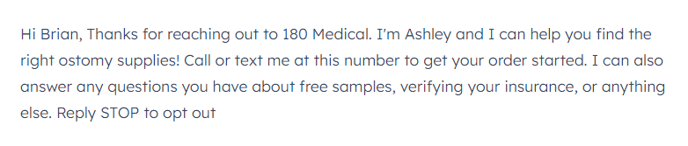
NOTE: Contacts should not be left in Call 1 long enough to get the Day 7 email unless special circumstances have put you behind schedule with follow-ups.
#### Follow-Up Expectations
- 1 business day
- [Online Lead Specialists](https://help.180medical.com/knowledge/online-lead-specialists?hsLang=en#main-content)
- [Deal Stage Details](https://help.180medical.com/knowledge/online-lead-specialists?hsLang=en#deal-stage-details)
[](https://180medical.com)
www.180medical.com Help Center
Copyright © 2026, 180 Medical